Livetopia: Party!
- 4.4
- Rating
- 50.00M
- Installs
- Free
- Price

 Analysis by App-foxy
I approached Livetopia: Party! as a casual game for short breaks rather than as a goal-driven adventure. Its central appeal is the freedom to create a role, move through a social world, and decide what to do next instead of following one fixed route. That makes it easy to enter without studying instructions, but it also means the experience depends heavily on your own willingness to explore, experiment, and make your own fun.
My first impression was that this is best understood as a light real-life simulator with a strong social-play flavor. You can treat it as a place to improvise stories, dress up a character, visit different areas, or simply spend a few minutes wandering around. It is free to start, although optional purchases range from $0.49 to $99.99 per item, so I would approach it with a clear spending limit if a child will be playing.
Where players usually get stuck
When the open-ended world feels confusing, I find it helps to separate a design choice from a problem with the session. This section looks at the expectations and small control habits that can make the first few minutes smoother, so the setup advice that follows has a clear starting point.
You May Also Like

 Blood Strike: 2.5 Anniversary
Blood Strike’s Loadouts Turn Every Drop Into a Tactical Gamble
A close look at Blood Strike’s custom loadouts: how fast access to signature weapons reshapes its battle royale rhythm, rewards preparation, and narrows the gap between fights.

 Pandora - Music & Podcasts
Pandora’s Music Is Easy to Start, but Harder to Recover
Pandora’s strength is its low-effort path from a seed to a station. Its weak spot is how much confidence it asks you to place in connection, setup, and quiet recovery.

 8 Ball Pool
 Is Built on Rivalries, Rematches, and Routine
A close look at the rivalries, rematches, shared routines, and unanswered safety questions that turn a quick pool match into a persistent mobile community.

 Samsung Music
’s Quiet Strength Is Playing What You Already Own
Its reach comes less from spectacle than from dependable access to a personal library. That simplicity is both the app’s strongest retention engine and its ceiling.

 AccuWeather: Weather Radar
AccuWeather Review: A Quick, Clear Forecast for Everyday Decisions
For everyday plans, the best forecast is the one you can understand quickly. AccuWeather makes rain timing, radar, and local conditions easy to act on, with a few trade-offs.

 Hill Climb Racing
Why Hill Climb Racing Still Turns Crashes Into One More Run
A tiny car, a bumpy hill and one more upgrade: Hill Climb Racing keeps resurfacing because its simple chaos makes every near-miss feel personal.
More From Our News Desk
View All News


The freedom can feel like a lack of direction
The biggest adjustment is that Livetopia: Party! does not naturally tell you what your personal objective should be. Players who expect a conventional casual game with clearly marked stages, quick rewards, or a simple win condition may wonder what they are supposed to do after the initial exploration. That is not necessarily a flaw, but it is an important part of the game’s design.
I found it more enjoyable when I gave myself a small purpose before entering: explore one area, try a different character style, meet other players, or build a short make-believe scenario. Without that kind of intention, the world can start to feel like a collection of places to visit rather than a game with momentum. Younger players may enjoy the open-ended nature immediately, while adults looking for structured progress may lose interest sooner.
Social interaction changes the experience
The party-oriented setting makes other players part of the atmosphere. That can make a quiet session feel lively, especially when several people are using the same space for their own stories. It can also create friction when other players do not cooperate, move unpredictably, or simply want to play in a different way.
For that reason, I would not judge the game only from a solo session. Its role-playing potential is stronger when you have friends or family members who understand the kind of playful improvisation it encourages. If you prefer private, focused play, a puzzle game or a traditional life simulator may be a better match.
Small controls matter more than expected
Open social worlds often ask you to move, select objects, change your character’s presentation, and react to what is happening around you. On a smaller phone, those actions can feel less comfortable than they do on a larger screen. I recommend taking a few minutes to learn the basic touch areas before trying to do anything elaborate.
When a tap seems not to work, I first check whether I am aiming at the correct interactive area, whether another menu is still open, and whether the character has finished moving. Repeating the same tap rapidly is usually less useful than closing the current screen and trying again. This simple habit prevents a lot of false “the game is broken” moments.
Setup checks that save time
Before launching, I like to make a quick check of the device, connection, and purchase settings rather than troubleshooting mid-session. These small preparations are especially useful when someone else will be playing, and they lead naturally to a practical order for handling interruptions if the game still misbehaves.
Check compatibility before blaming the installation
The Android release requires Android 7.0 or newer. That is a broad compatibility range, but an older phone may still struggle with loading, heat, storage pressure, or background activity even when the operating system meets the requirement. Before installing, I would update the device, restart it, and make sure there is comfortable free storage rather than relying on the minimum available space.
The game is published by Century Games PTE. LTD. and is available at no purchase price. “Free” here means you can begin without paying, not that every possible item or convenience is included automatically. I would review the purchase settings on the device before handing it to a child, particularly because the listed in-app purchase range reaches $99.99 for an individual item.
Use a stable first session
The first launch is the worst time to test the game on an unreliable connection or while switching repeatedly between apps. A stable Wi-Fi connection, a charged device, and a freshly restarted phone give you a much clearer idea of whether the game is ready to run properly. If loading stalls, I would close other demanding apps, reopen the game once, and avoid tapping repeatedly while the screen is still responding.
This is also a good time to decide whether the game suits the person who will use it. The content rating is Everyone 10+, so parents should still consider the social nature of the experience and whether the child is ready to interact responsibly in a shared game environment. The age label is useful guidance, but it does not replace a parent’s own judgement about screen time and online behavior.
Do not confuse account or connection issues with game design
A player may describe the game as “empty” when the real issue is that a session has not connected correctly or that the player is expecting a guided campaign. I separate those possibilities by trying a basic activity first: move through the environment, open an available interaction, and see whether the game responds consistently. If movement and menus work but the world feels directionless, that is probably a preference issue rather than a technical failure.
Likewise, if the game closes or becomes unresponsive only after the phone has been running for a long time, I would test after a restart. Heat, low memory, and a crowded background process list can affect any mobile game. Keeping the device updated and avoiding simultaneous heavy apps are sensible first steps before reinstalling anything.
Recovering a session when something goes wrong
A short, repeatable recovery routine is more useful than changing several settings at once: it helps identify whether the trouble is temporary and avoids accidental taps while the game is slow. Next, I’ll look at the clues that point away from the game itself and toward the phone or network.
Use a simple recovery order
My preferred recovery sequence is deliberately boring: wait briefly, check the connection, close and reopen the game, restart the phone if needed, and only then consider reinstalling. This order protects time and avoids treating every temporary loading problem as a permanent loss. It is especially useful for a game built around casual drop-in sessions, where a quick reset is often enough to get back to playing.
If an interaction appears stuck, I move away from the area, close any open interface, and try again from a different position. If that does not help, I leave the current session and start a fresh one. I would avoid repeatedly purchasing anything while troubleshooting, because a delayed screen can make it unclear whether a tap registered.
Keep expectations realistic after a reset
Open-ended games can make it difficult to tell whether a reset changed anything. I use a repeatable check: can I enter normally, move around, access the same basic interaction, and complete a short activity without the problem returning? If the answer is yes, the issue was likely temporary. If the same failure appears every time, I would record exactly when it happens and contact the appropriate app support channel rather than guessing.
This approach is also useful for distinguishing a missing feature from a malfunction. If you cannot find a structured mission system, a particular reward loop, or a specific social option, first consider whether the game is simply not built around that activity. The store summary presents it as a simulator where you choose what to do, so its flexibility should not be mistaken for a conventional progression system.
Protect the fun by setting boundaries
Because the game is free to begin and includes optional purchases, I recommend deciding in advance what “finished” means for a session. For me, that might be exploring one location or creating one short scenario. This keeps the experience from turning into endless menu browsing or pressure to acquire every available item.
For a family device, I would use the operating system’s purchase protections and talk through the difference between a free download and paid extras. That conversation is more practical than simply saying “do not buy anything,” because it teaches the player to recognize when a choice involves real money.
When the game is not the cause
Even a well-prepared session can feel rough when the device is struggling or the connection is unstable. I use those context clues before judging the experience, then consider whether the game’s social, open-ended format is actually a good fit for the player.
Device limitations can shape the verdict
A phone that technically runs the game may still deliver an uneven experience if it is older, nearly full, or already warm. Social environments can feel particularly demanding because there may be more activity on screen than in a simple one-screen casual title. If the game feels slow only on one device, I would compare it after a restart and with other apps closed before deciding that the installation itself is faulty.
Screen size also changes how comfortable the game feels. On a larger display, exploring and selecting small interface elements is easier. On a compact phone, I would keep sessions shorter and use deliberate taps rather than quick swipes. That is not a hidden setting or a guaranteed fix; it is simply a practical way to reduce control mistakes.
Connection quality affects social play
If the world feels unusually quiet, interactions take too long, or other players appear inconsistent, the network may be contributing. I would test from a stronger connection and avoid judging the social side during a single unstable session. A good connection cannot change the game’s open-ended design, but it can prevent technical interruptions from making that design seem less engaging than it is.
Players who want a completely offline experience should think carefully before choosing this game. Its appeal is tied to a shared, flexible environment, whereas a standalone puzzle or offline simulation usually offers more predictable behavior. On the other hand, people who enjoy spontaneous role-play may find that unpredictability is exactly what gives a session its character.
Know who will enjoy the format
I would recommend Livetopia: Party! to players who like decorating a personal identity, inventing situations, and exploring without being pushed through a strict storyline. It can work well for a short after-school session, a relaxed break, or a shared imaginative activity where everyone agrees on a pretend scenario. The useful trick is to bring your own idea instead of waiting for the game to supply a complete one.
I would skip it if your priority is deep strategy, a carefully balanced challenge, a long campaign, or a clear sense of measurable achievement. In those cases, a level-based casual game will probably feel more rewarding. This title is closer to a digital playground than a traditional score-chasing game, and that distinction should guide your expectations before downloading.
My practical verdict after living with the format
The game has a genuine strength: it gives casual players room to decide what kind of session they want. That flexibility makes it approachable and gives friends plenty of space to invent their own activities. Its weakness is the same feature viewed from another angle. Without a personal plan, the experience can feel unfocused, and players who want constant rewards may interpret freedom as a lack of content.
The current version is 1.7.579, and the game has reached over 50 million installs with a 4.4 average from around 140 thousand ratings. Those figures suggest that the format has broad appeal, but popularity does not remove the need to match the game to the right player. I would treat the rating as a starting signal, not a promise that every casual gamer will enjoy an open social simulator.
My recommendation is therefore specific: try it if you want a free, imaginative space for light role-play and exploration, especially if you have someone to play with. Before starting, check the Android requirement, prepare the device, and set purchase boundaries. During play, create a small objective and use the recovery steps above if loading or controls behave oddly.
Livetopia: Party! is at its best when I treat it as a place to make up activities rather than a game that must provide a checklist. That makes it a pleasant choice for creative, social-minded players, but a poor one for anyone seeking a tightly directed challenge. If you understand that trade-off, the decision is straightforward: download it for flexible make-believe, or choose a more structured alternative when progress and competition matter more than freedom.
FAQs for Livetopia: Party!
01What is Livetopia: Party! and what can you do in the game?
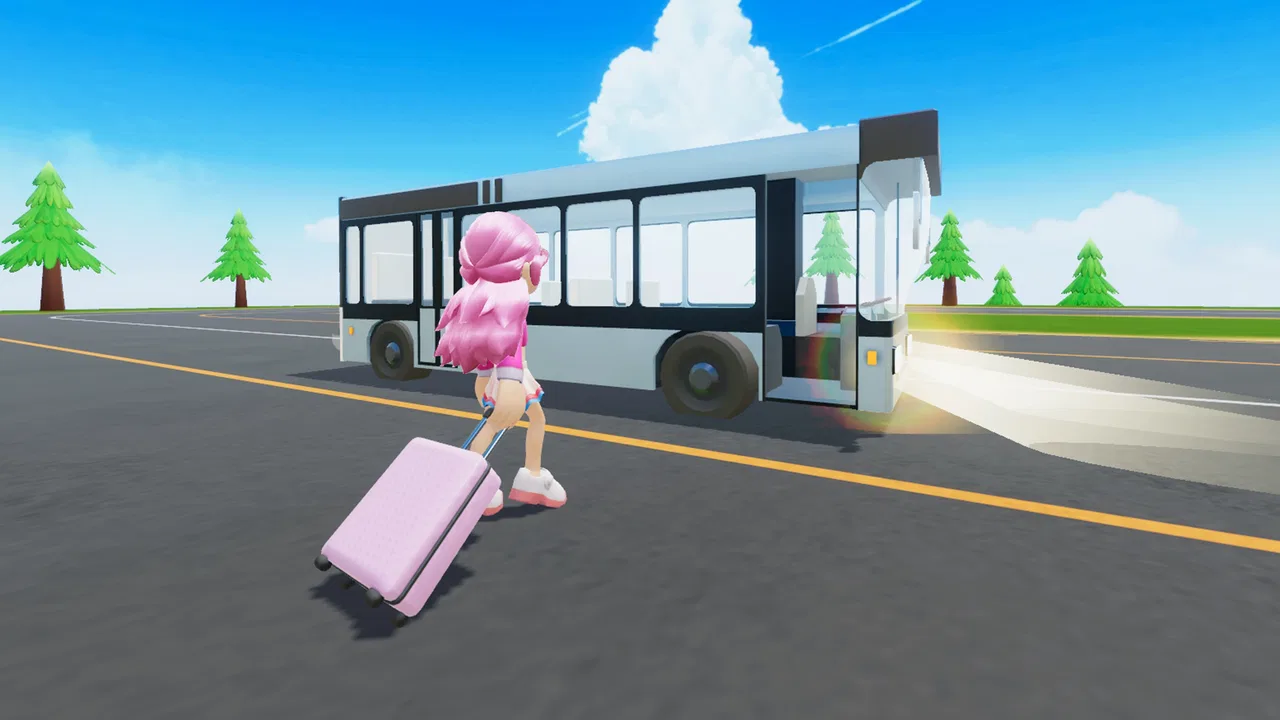
Livetopia: Party! is a social role-playing game focused on exploration, customization, and casual interaction. After entering its colorful world, you can choose different outfits, decorate or visit homes, explore locations, use vehicles, and take part in playful activities with other players. It is less about completing a fixed story and more about creating your own scenarios, meeting friends, and enjoying open-ended roleplay.
02Is Livetopia: Party! free to download and play?
The game is generally available as a free download, allowing players to access its main world and many activities without an initial purchase. However, optional in-game purchases may provide additional outfits, accessories, items, or other customization choices. Parents should review the purchase settings on the device, especially if children use the account, because free-to-play games can include paid content and promotional offers.
03Can children play Livetopia: Party! safely?
Livetopia: Party! is designed with a bright, family-friendly presentation, but it includes online features and interaction with other players. As with any multiplayer social game, conversations and player behavior may not always be predictable. Parents should check the available privacy, chat, and parental-control settings, discuss safe online behavior with children, and supervise younger players when necessary.
04Does Livetopia: Party! require an internet connection?
Yes, an internet connection is normally required because the game is built around shared online environments, multiplayer interaction, and regularly updated content. A stable Wi-Fi or mobile-data connection helps reduce loading problems, disconnections, and delays while exploring the map. Performance can also depend on the device, so older phones or tablets may experience longer loading times or reduced visual quality.
05Is Livetopia: Party! suitable for players who do not want competitive gameplay?
Yes, the game is mainly aimed at relaxed social play rather than traditional competition. You can explore, customize your character, visit different areas, role-play everyday situations, and participate in activities at your own pace. While other players may be present and some features encourage interaction, there is no need to focus on rankings or difficult battles, making it suitable for casual players who enjoy creativity and social worlds.
Pros
- Large open world with many places to explore and activities to try.
- Frequent roleplay possibilities encourage creativity and social interaction.
- Character customization offers plenty of ways to create a personal style.
- Simple controls make the game accessible for younger players.
- Regular events and updates can keep the experience feeling fresh.
Cons
- Online interaction may expose children to inappropriate player behavior.
- Some customization items and features may require in-app purchases.
- The open-ended gameplay can feel repetitive without friends to join.
- Performance may vary on older devices or weaker connections.
- The busy environments can sometimes make navigation and objectives unclear.

Livetopia: Party!
Gallery